pdit: The Python Un-Notebook for Coding Agents
I have been a fan of computational notebooks for a long time. At my previous company, Peter Engelbrecht introduced me to R, and we ended up doing most of our BI work in R Notebooks. It felt like a breath of fresh air after point-and-click dashboards. Who knew you could just write code and churn out nice reports? Then notebooks disappeared from my life for a while, until I went back to school to study biotechnology. Suddenly I was again analyzing data and generating plots. This time on bacterial growth instead of customer churn, but the tools were mostly the same. Something did change, though: coding agents.
With coding agents in the loop, the way I interact with code changes. I spend more time reading code and less time writing it. I recently released pdit, a Python “un-notebook,” my attempt at building something notebook-like but designed for this workflow. pdit does two things differently: it does away with notebook cells, and it works with plain Python.
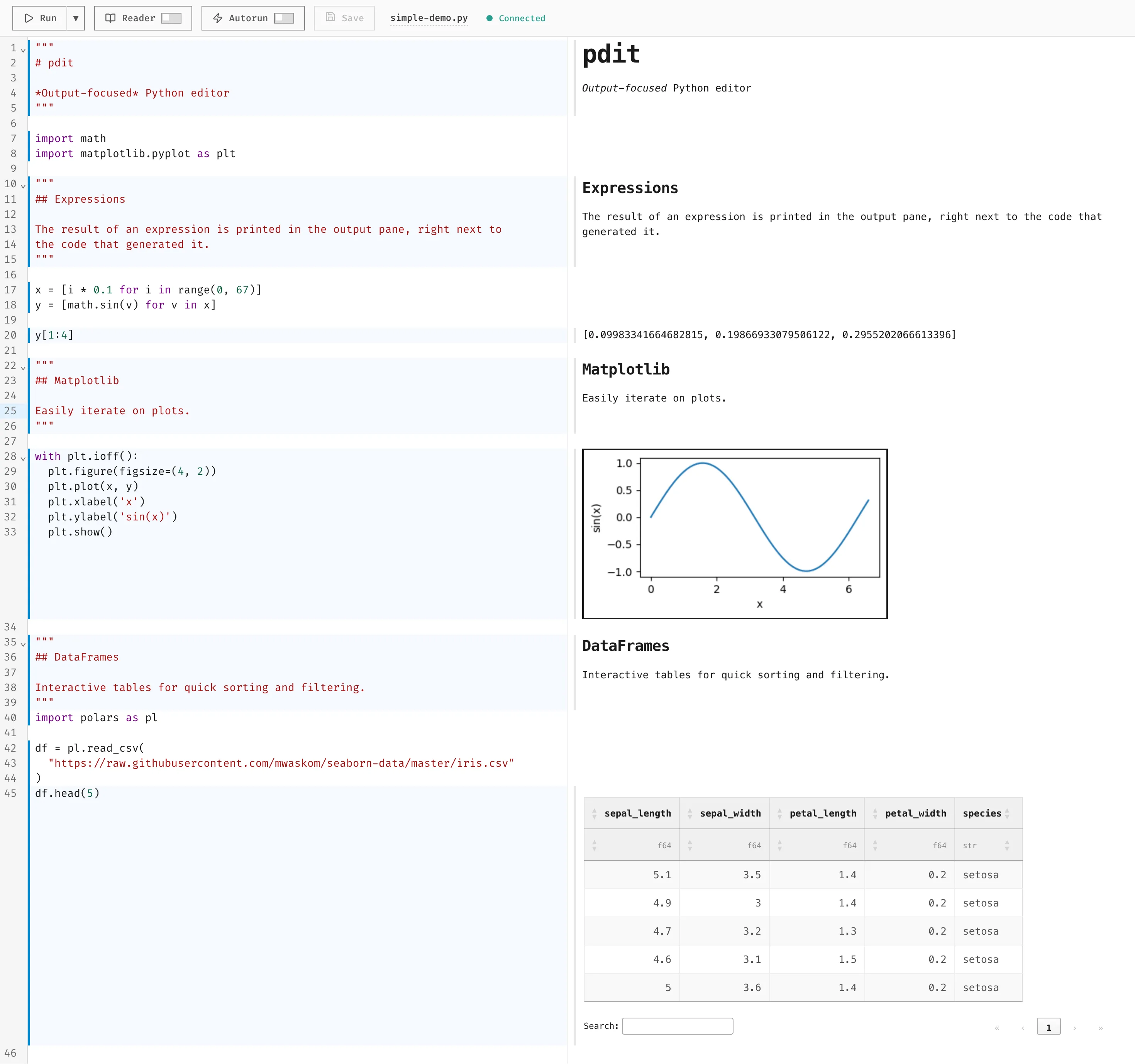
This is what it looks like:
Expressions, not cells
The basic unit in notebooks is the cell. A cell is a group of one or more lines of code. The value of the last line in the cell is rendered in the notebook1. This makes sense if your focus is on presenting something to someone. You transform data and show the result. It is also not too bad when manually writing code, because you write line by line and see the output of the most recent line.
I think it breaks down as a tool used to verify code written by coding agents. In pdit, there is no notion of cells. By default, pdit shows output from each top level expression2. You immediately see intermediate steps, which makes it easier to interrogate and verify code. A coding agent might generate code like this:
df = load_raw("batch_042.csv")
df = clean(df)
df["growth_rate"] = estimate_growth(df)
df.groupby("strain")["growth_rate"].mean()
In pdit, each top level expression renders, so I immediately see intermediate states. In a cell-based flow, I often only see the final line unless I manually add debug output.
Just Python files
pdit starts from the realization that you do not need a special file format to make something notebook-like. A regular Python script will do, with a few conventions, such as rendering top-level strings as Markdown. This is close to Jupytext, an excellent tool that turns Jupyter notebooks into plain Python scripts with cell delimiters. The difference is exactly there: pdit does not need conversion to and from Python scripts, because it works directly with scripts.
Why does that matter? Coding agents. You can point an agent at a Python file while it is open in pdit, and pdit will automatically pick up changes the agent makes to the file. pdit then becomes a HUD for AI-written code, especially when combined with support for rendering HTML components.
pdit is a tool
I have a lot of feature ideas for pdit, but what excites me most is that it feels like an orthogonal utility, without prescribing one way of working. Most of the power, I think, comes from that flexibility. I want pdit to be a tool that makes code tangible, narrowing the gap between code and output, which to me are often two sides of the same coin. In the best case, using pdit should feel like opening the hood of a car with the engine running, so you can actually see what your code is doing.
If you want to try it out, you can be up and running with a demo in less than a minute if you have uv installed:
uvx --with "pdit[demo]" pdit --demoOtherwise, check out the website at pdit.dev.
Footnotes
Questions, ideas, or feedback? I'd love to hear from you at harry@vangberg.name.